
What's it about?
The Advent calendar tradition is very well known in German-speaking countries; every child looks forward to opening the first doors as early as November. Little by little, this wonderful idea is spreading to many other countries as well, and naturally, many organizations and companies want to put a smile on the faces of their international audience. Our experience backs this up: A door calendar has already been created in nearly every country on Earth! That’s why we’ve taken on this challenge with the new version of Türchen and developed the “International” feature for the digital (Advent) calendar. In this article, we’ll show you exactly what it is and how to use it.
How the new feature works
Of course, we want to make life and Türchen as easy as possible for the users of your calendar. That's why we deliberately did without a language changer. At least at first glance. Because the right language will be selected all by itself! Your visitor won't even notice the new feature. This is because everyone has set a language in their browser in which they would prefer to have a web page displayed. If this is for example English (and the calendar has an English version stored), then the calendar is simply displayed in English. As if by magic. And if this should not fit, then there is simply a language changer at the end of the calendar. There, all languages that you created can be selected.
In the "Enterprise"-Package, the feature is already included. For Business and Premium, it can simply be added via the extensions.
Step by step to an international digital calendar
First you have to define in which languages the calendar should be available. To do this, go to: Settings → Languages.
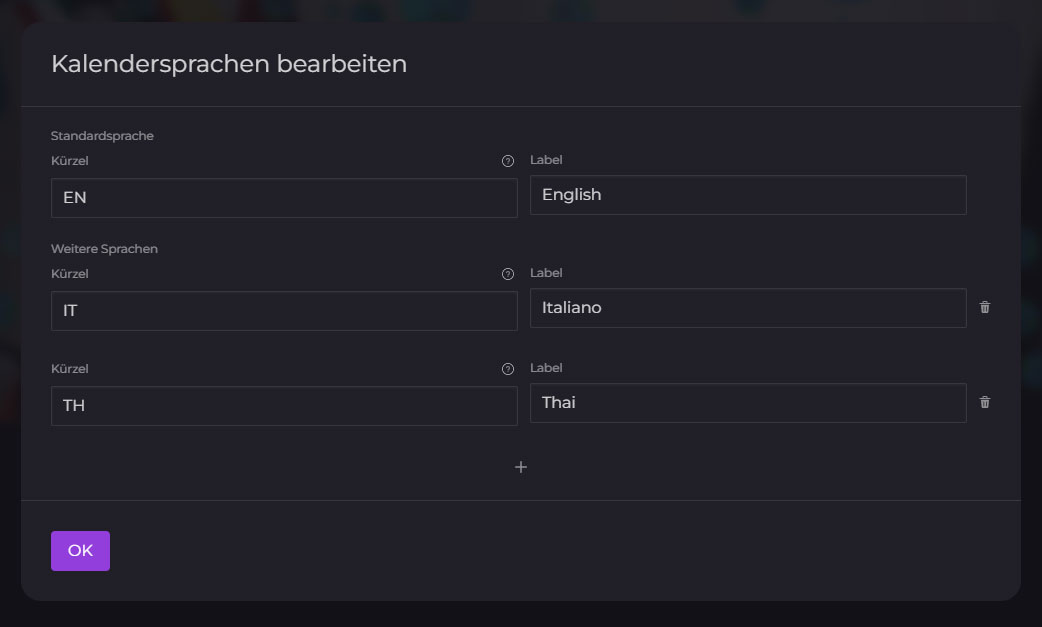
You can edit this list at any time and add more options. As language abbreviation you should use the 2-digit language abbreviation according to ISO 639-1. You can find all abbreviations here.
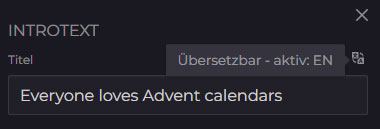
Once the languages are created, you have to save the calendar once. Now the languages are available in a dropdown list and you can switch between them and edit the calendar in all languages. By the way: You can edit all fields that have the icon  on the side. And if you hover your mouse over the icon, you can also see which language you are in:
Attention: We have provided far more than 1000 fonts to choose from in Türchen.com. Some character sets like Russian, Thai or Chinese are not available for every font. Therefore, it is best to test which font works well with all the languages used before you publish the calendar.
Want to play it safe again?
Language abbreviations according to ISO 639-1
| Acronyms | Language |
|---|---|
| aa | Afar |
| ab | Abchasisch |
| af | Afrikaans |
| am | Amharisch |
| ar | Arabisch |
| as | Assamesisch |
| ay | Aymara |
| az | Aserbaidschanisch |
| ba | Baschkirisch |
| be | Belorussisch |
| bg | Bulgarisch |
| bh | Biharisch |
| bi | Bislamisch |
| bn | Bengalisch |
| bo | Tibetanisch |
| br | Bretonisch |
| ca | Katalanisch |
| co | Korsisch |
| cs | Tschechisch |
| cy | Walisisch |
| da | Dänisch |
| de | Deutsch |
| dz | Dzongkha, Bhutani |
| el | Griechisch |
| en | Englisch |
| eo | Esperanto |
| es | Spanisch |
| et | Estnisch |
| eu | Baskisch |
| fa | Persisch |
| fi | Finnisch |
| fj | Na Vosa Vakaviti |
| fo | Färöisch |
| fr | Französisch |
| fy | Friesisch |
| ga | Irisch |
| gd | Schottisches Gälisch |
| gl | Galizisch |
| gn | Guarani |
| gu | Gujaratisch |
| ha | Haussa |
| he | Hebräisch |
| hi | Hindi |
| hr | Kroatisch |
| hu | Ungarisch |
| hy | Armenisch |
| ia | Interlingua |
| id | Indonesisch |
| ie | Interlingue |
| ik | Inupiak |
| is | Isländisch |
| it | Italienisch |
| iu | Inuktitut |
| iw | Hebräisch (veraltet, nun: he) |
| ja | Japanisch |
| ji | Jiddish (veraltet, nun: yi) |
| jv | Javanisch |
| ka | Georgisch |
| kk | Kasachisch |
| kl | Kalaallisut (Grönländisch) |
| km | Kambodschanisch |
| kn | Kannada |
| ko | Koreanisch |
| ks | Kaschmirisch |
| ku | Kurdisch |
| ky | Kirgisisch |
| la | Lateinisch |
| ln | Lingala |
| lo | Laotisch |
| lt | Litauisch |
| lv | Lettisch |
| mg | Malagasisch |
| mi | Maorisch |
| mk | Mazedonisch |
| ml | Malajalam |
| mn | Mongolisch |
| mo | Moldavisch |
| mr | Marathi |
| ms | Malaysisch |
| mt | Maltesisch |
| my | Burmesisch |
| na | Nauruisch |
| ne | Nepalesisch |
| nl | Niederländisch |
| no | Norwegisch |
| oc | Okzitanisch |
| om | Oromo |
| or | Oriya |
| pa | Pundjabisch |
| pl | Polnisch |
| ps | Paschtu |
| pt | Portugiesisch |
| qu | Quechua |
| rm | Rätoromanisch |
| rn | Kirundisch |
| ro | Rumänisch |
| ru | Russisch |
| rw | Kijarwanda |
| sa | Sanskrit |
| sd | Zinti |
| sg | Sango |
| sh | Serbokroatisch (veraltet) |
| si | Singhalesisch |
| sk | Slowakisch |
| sl | Slowenisch |
| sm | Samoanisch |
| sn | Schonisch |
| so | Somalisch |
| sq | Albanisch |
| sr | Serbisch |
| ss | Swasiländisch |
| st | Sesothisch |
| su | Sudanesisch |
| sv | Schwedisch |
| sw | Suaheli |
| ta | Tamilisch |
| te | Tegulu |
| tg | Tadschikisch |
| th | Thai |
| ti | Tigrinja |
| tk | Turkmenisch |
| tl | Tagalog |
| tn | Sezuan |
| tn | Sezuan |
| to | Tongaisch |
| tr | Türkisch |
| ts | Tsongaisch |
| tt | Tatarisch |
| tw | Twi |
| ug | Uigur |
| uk | Ukrainisch |
| ur | Urdu |
| uz | Usbekisch |
| vi | Vietnamesisch |
| vo | Volapük |
| wo | Wolof |
| xh | Xhosa |
| yi | Jiddish |
| yo | Joruba |
| za | Zhuang |
| zh | Chinesisch |
| zu | Zulu |
Any questions?
Then feel free to check out our Help-Center or watch our YouTube channel for explanations.